

SOFTWARE USER GUIDE
Water Treatment & Storage
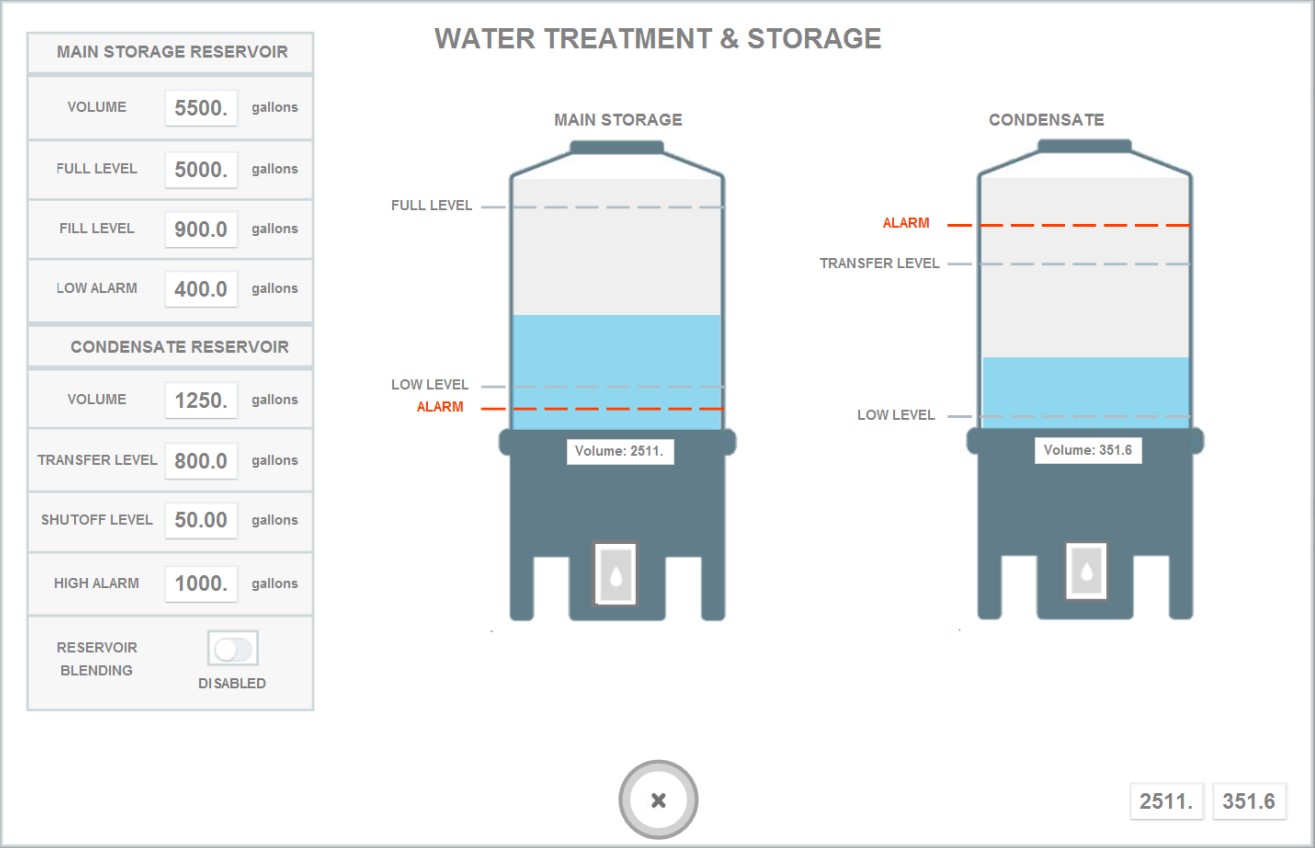
Main Storage Reservoir. For projects that utilize condensate or water management, you will be able to control your settings from the Water Treatment or Water Storage tab. Your "Main Storage Reservoir" will be where your fresh water is contained. This can be R/O water, well water, or tap water etc.
• To start, enter the volume capacity of your main tank that stores water i.e. 1000 gallons, 5000 gallons in the space titled "Volume."
• Next enter the highest volume you would like the tank to stop filling at in the space titled "Full Level." The valve will always close at this level.
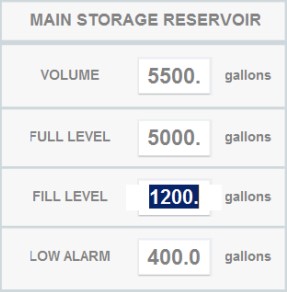
• Next enter the volume which should trigger the system to start filling the reservoir with water (i.e. start your RO system) in the space titled "Fill Level" or "Low Level."
• Lastly, enter the volume for the alarm level in the space titled "Low Alarm." The system will email you an alert that the reservoir has reached its lowest level in case you are using water faster than it is filling.
Note: The system will have a 10-20 second delay before the image changes to the numerical values you have set.
• Next enter the highest volume you would like the tank to stop filling at in the space titled "Full Level." The valve will always close at this level.
• Next enter the volume which should trigger the system to start filling the reservoir with water (i.e. start your RO system) in the space titled "Fill Level" or "Low Level."
• Lastly, enter the volume for the alarm level in the space titled "Low Alarm." The system will email you an alert that the reservoir has reached its lowest level in case you are using water faster than it is filling.
Note: The system will have a 10-20 second delay before the image changes to the numerical values you have set.

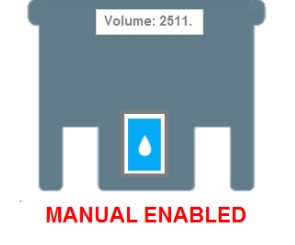
You may also press the box at the bottom of the reservoir image with the water droplet inside. This will activate manual mode which will start filling the reservoir with water regardless of the level. There is a float switch at the top which will prevent overflowing if you walk away while in manual mode.
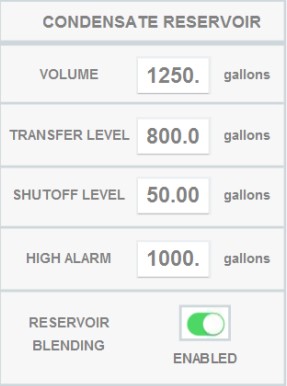
Condensate Reservoir. You can also control the reservoir where condensate water is collected from ACs/dehumidifiers.
• To start, enter the volume capacity of your main tank that stores the condensate water i.e. 1000 gallons, 5000 gallons in the space titled "Volume."
• Next select the toggle for "Reservoir Blending" if you'd like to activate the feature where the system will automatically transfer the condensate water to the main storage tank at your designated settings.
• Next enter the volume which should trigger the system to start transferring the condensate water over to the main storage reservoir in the space titled "Transfer Level."
• Next enter the volume level you'd like the system to stop transferring the condensate water over at in the space titled "Shutoff Level."
• Lastly, enter the volume for the alarm level in the space titled "High Alarm." The system will email you an alert that the reservoir has reached its highest level in case the condensate is filling faster than you are using it.
Note: The system will have a 10-20 second delay before the image changes to the numerical values you have set.
• Next select the toggle for "Reservoir Blending" if you'd like to activate the feature where the system will automatically transfer the condensate water to the main storage tank at your designated settings.
• Next enter the volume which should trigger the system to start transferring the condensate water over to the main storage reservoir in the space titled "Transfer Level."
• Next enter the volume level you'd like the system to stop transferring the condensate water over at in the space titled "Shutoff Level."
• Lastly, enter the volume for the alarm level in the space titled "High Alarm." The system will email you an alert that the reservoir has reached its highest level in case the condensate is filling faster than you are using it.
Note: The system will have a 10-20 second delay before the image changes to the numerical values you have set.

You may also press the box at the bottom of the reservoir image with the water droplet inside. This will activate manual mode which will start transferring the condensate water over to the main storage reservoir manually.


.svg)